
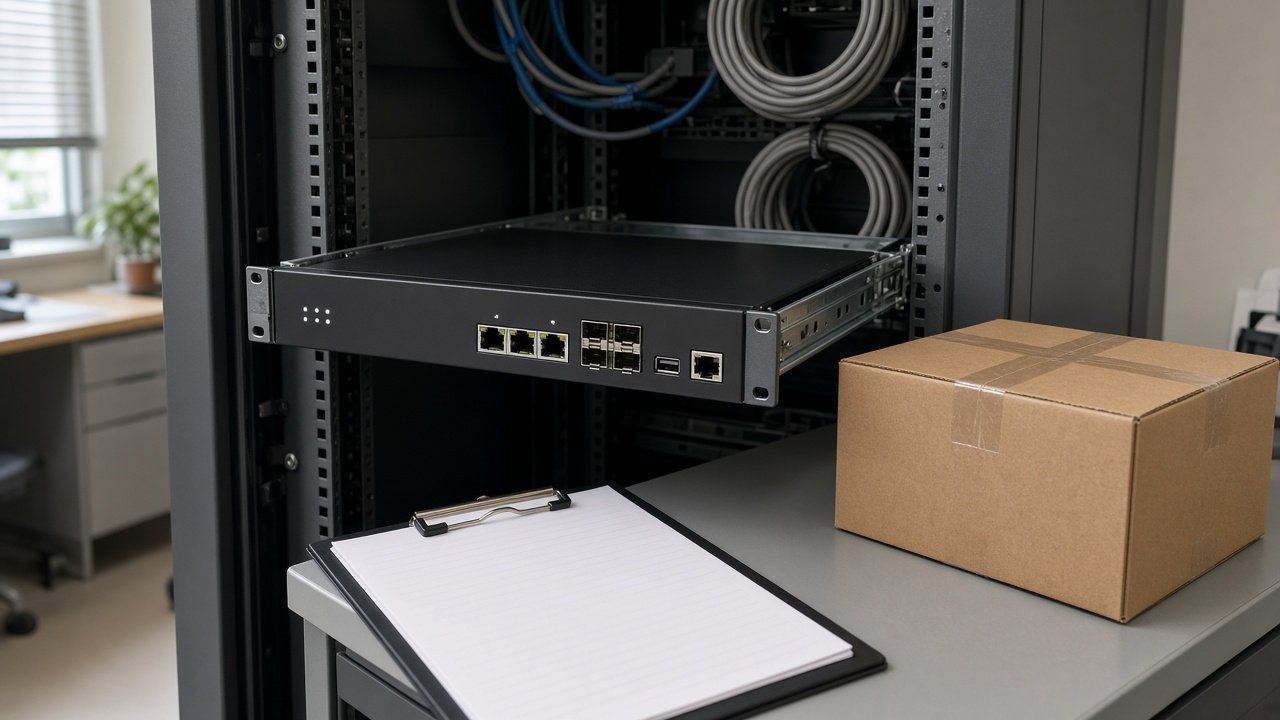
In short: When a Hong Kong office has to retire office firewalls — the hardware firewall, unified-threat-management (UTM) or similar security appliance that sits at the edge of a branch network, in a comms closet, or in a small on-site rack — the job is not finished by unplugging the WAN cable. The appliance is not a LAN access switch, and it is not a Wi-Fi access point. Many of these units still hold virtual-private-network (VPN) settings, certificates and keys, local administrator accounts, security policies, and traffic or authentication logs. A USB port, an SD card slot, or an internal storage module may still hold a configuration backup or leftover media. Leased, landlord-provided or colocation-supplied units often have to go back to the provider, sometimes still configured. Returning the hardware, or sending owned units for recycling, does not by itself end the organisation’s duty to protect personal data still stored on the appliance or on leftover media. Confirm the return rules in writing if the hardware is not yours, clear what you are allowed to clear, and keep a record of what was actually done.
This article is general information, not legal advice, and it is not a summary of any particular lease, landlord, serviced-office, colocation or data-centre contract. Not every firewall or UTM appliance stores the same data, and some smaller units hold little more than firmware and a basic configuration. Platforms and models differ. Check the unit in front of you, and ask the vendor, landlord or facility operator to confirm the return rules in writing, before you reset, recycle, or withhold a unit that does not belong to you.
Why retiring a firewall is not the same as retiring a switch or an access point
A hardware firewall or UTM appliance is built to inspect and control traffic, to terminate a VPN, and often to enforce web-filtering, intrusion-prevention or application-control policy. In a Hong Kong office that is packing a comms room for a floor closure, an office move, or a hardware refresh, the box is easy to treat as just another black 1U unit and to throw into the same carton as a spare switch or a rail kit. That habit misses the point. The appliance may still hold the credentials and policy that once protected the office, or a log of who connected.
This guide is about office and branch firewalls, UTM appliances, and similar dedicated security appliances used in a Hong Kong office, a branch comms closet, or a small on-site rack. It includes an appliance that also routes traffic, because many small-office units combine those functions. It is written for overseas headquarters and regional IT, security or compliance teams retiring this hardware, including a floor that is moving, a branch that is closing, or a colocation or serviced-office fit-out being handed back.
It is not a guide to retiring a LAN access switch, a Wi-Fi access point, or a KVM switch or rack console unit. Those devices can travel in the same collection, but they answer different questions and are covered on their own pages. It is also not a guide to erasing or destroying the file servers, backup devices or user computers that sat behind the firewall. If a removable drive is later taken out of an appliance, treat that drive as its own inventory line; for the evidence trail on drives, see our note on hard drive chain of custody in Hong Kong.
What may still be stored, attached, or recorded — and what often is not
What a unit can hold depends on the model and on how it was used. It is worth separating the common cases, because the risk is not the same for every box.
- VPN and remote-access configuration. Site-to-site and remote-access VPN settings can include pre-shared keys, digital certificates and private keys, peer addresses, and a list of user or group names allowed to connect. Those items can still be present after the WAN circuit has been cancelled.
- Local accounts and directory bindings. Many appliances store local administrator or operator accounts. Some also hold the settings used to look up users in a directory, RADIUS or similar service — not a full copy of that directory, but enough to show how the office was authenticated.
- Security policy and network configuration. Firewall, network-address-translation (NAT) and routing rules, web-filter or application-control policy, management addresses, and SNMP or syslog destinations can all remain in the local configuration.
- Logs. Traffic, authentication, VPN or system logs may be stored locally, sent to a syslog server, or both. Local logs can still be on the appliance after it is unplugged. A leftover log is not automatically a tax business record, and it is not automatically disposable; that depends on what the log actually contains and on your own retention rules.
- Leftover media and internal storage. USB ports, SD or compact-flash slots, and, on some models, an internal storage module can hold a configuration backup, a firmware image or leftover files. A paper label on the chassis, or a note taped inside a rack door, can also hold a password or a key.
What the firewall usually does not hold is a copy of the organisation’s file servers or user mailboxes. Unplugging or recycling the appliance does not wipe those systems, and a clean firewall does not prove that a server was erased. Treat the two jobs separately in the inventory and in the handover record. The same warning applies to neighbouring office kit that is easy to pack in the same carton: those devices have their own accounts, logs or leftover media, and they are not cleared by handling the firewall.
A factory reset is often important — and is not automatically sufficient
For a firewall or UTM appliance, a supported factory reset, or the vendor’s documented procedure for clearing local accounts, certificates, keys, policy and logs, can be an important step before the unit leaves your control. A still-valid VPN certificate, a leftover pre-shared key, or an administrator account can otherwise travel with the appliance to a lessor, a recycling site, or another floor.
A reset is not automatically required for every small or unmanaged unit, and it is not automatically allowed on a unit you do not own. Some return conditions expect the appliance to come back in a working, still-configured state. A reset is also not automatically sufficient. It does not remove a flash drive or SD card left in a slot, a paper label on the chassis, a configuration backup stored on an administrator’s computer, or accounts and certificates that still exist on a directory, a certificate authority or a replacement appliance. If a certificate or VPN credential remains valid after the old box is packed, your own IT or security team still has to decide whether to revoke or rotate it. If the model has no supported reset, or you are not allowed to use one, record that fact rather than inventing a step the hardware cannot perform.
Leased, landlord-provided, colocation and company-owned units
Ownership decides what you are allowed to do. A firewall or UTM appliance may belong to the company, to a landlord or serviced-office operator as part of a fit-out, to a colocation or data-centre provider, to a network or security vendor as a managed-service device, or to a hardware lessor. The same rack can hold a mix of these. Confirm that in writing before you reset, recycle, or withhold a unit.
If the unit is leased or provided by a facility or a managed-service vendor, ask the provider, in writing, whether a reset is required, allowed, or forbidden; whether local accounts, certificates, keys and logs must be cleared; and which accessories — power supplies, rack-mount kits, plug-in modules or console cables — must travel with it. If you are not allowed to clear the appliance, record what you could and could not check when it left your control. Recycling a unit that does not belong to you, or stripping a kit against the contract, can create missing-parts or service issues. Company-owned units are a different decision, and can be planned with the rest of an office relocation or computer disposal in Hong Kong, or as part of an ITAD plan for an overseas company retiring a local office.
Personal data, retention and tax records are not the same issue
Hong Kong’s Personal Data (Privacy) Ordinance (PDPO) and Inland Revenue record-keeping rules answer different questions. One is about whether personal data should still be kept, and how it should be protected or erased when the original purpose has ended. The other is about business records that a person carrying on a trade, profession or business in Hong Kong may have to retain for tax purposes. They are not interchangeable, and a firewall retirement does not collapse them into a single “keep everything for seven years” or “delete everything now” rule. For a longer discussion of that distinction in an IT-disposal setting, see our guide to PDPO data retention and IT disposal in Hong Kong.
On 26 November 2026 this publishing environment retrieved the Inland Revenue Department’s English record-keeping page at https://www.ird.gov.hk/eng/tax/bus_rke.htm (HTTP 200, page title “IRD : Record Keeping”). That page states that section 51C of the Inland Revenue Ordinance requires every person carrying on a trade, profession or business in Hong Kong to keep sufficient records in the English or Chinese language of his income and expenditure to enable the assessable profits to be readily ascertained, and that such records shall be retained for a period of not less than 7 years. The records prescribed on that page include books of accounts, vouchers, bank statements, invoices, receipts, records of assets and liabilities, and day-to-day records of money received and expended, among other items listed there.
That seven-year period applies to those business records. It does not automatically apply to a leftover USB stick, a firewall traffic log, a local appliance account, a VPN pre-shared key, or an ordinary file that is not a tax record. Do not store every log or leftover file found on a firewall for seven years “because of tax,” and do not delete a business record you are required to keep only because a copy once sat in a configuration backup. A legal hold, an investigation or a contract may also require you to retain particular records. This article cannot tell you which of your files falls into which category; your own legal, tax and records teams have to make that call.
The official PCPD English “ordinance at a glance” page and the erasure guidance PDF are linked here for reference: https://www.pcpd.org.hk/english/data_privacy_law/ordinance_at_a_Glance/ordinance.html and https://www.pcpd.org.hk/english/publications/files/erasure_e.pdf. Live fetches on 26 November 2026 returned HTTP 200, but the bodies were short JavaScript bot-protection pages, not the document text. This article therefore links those official URLs and does not quote them, because the files could not be retrieved from this publishing environment on that date.
A practical order of work
The useful sequence is usually confirmation, a physical and configuration check, a permitted reset where it applies, a review of credentials that may still be valid elsewhere, inventory, then packing — not the other way around. Adapt it to the site, but avoid sealing a carton of firewalls simply because a circuit cancellation or a server collection is booked.
- Confirm ownership and return rules in writing for every unit, including power supplies, rack-mount kits, plug-in modules and console cables issued with it, and whether a reset is required, allowed or forbidden.
- Inspect every USB port, SD or compact-flash slot, and any removable storage module before the unit is packed. Remove leftover media. Handle those items under your removable-media policy; do not leave them in the appliance.
- Review what you are allowed to review: local accounts, VPN settings, certificates and keys, security policy, logs, and management addresses. Record the management IP address or hostname if you use one in your network records.
- Ask your IT or security team to review credentials that may still be valid outside the box — for example a certificate, a VPN pre-shared key, or a directory account used for administration — and to revoke or rotate them if that is the right step for your environment. This article cannot prescribe that decision for every site.
- Inventory by site, room and rack: model, asset tag or serial if present, and whether the unit is owned, leased, landlord- or facility-provided, or supplied as a managed-service device.
- Update network and asset records you control, such as a management-network allow-list, a DNS or DHCP reservation, a monitoring entry, or a rack diagram that still names the firewall.
- Reset or clear the appliance only where you are allowed to, and only if the model actually offers a supported method. Do not treat a reset as a substitute for the media check, for credential review, or for handling the systems that sat behind the firewall.
- Pack the unit with the accessories the return list requires, and keep leftover media and paper password labels out of that carton unless the owner of those items has been identified and the items are being returned on purpose.
- Record what was done and what could not be completed, with the name or role of the person who did it and the date.
What to record before the hardware leaves
For overseas compliance teams, a short inventory is usually more useful than a photograph of a pile of black 1U boxes. Record, at least:
- The model, asset tag or serial if present, and the site, room and rack position.
- Whether the unit is owned, leased, provided by a landlord, serviced office, or a colocation or data-centre operator, or supplied as a managed-service device, and whether it must be returned to that provider.
- The management IP address or hostname if you use one, and whether a power supply, rack-mount kit or plug-in module was packed with the unit.
- Whether leftover media or a removable storage module was found, and what was done with those items.
- Whether a supported reset or account-clearing step was completed, attempted, not allowed, or not applicable.
- Whether your team reviewed certificates, VPN credentials or administrative accounts that may still be valid outside the appliance, and what was decided, if that review was in scope.
- Who handed the units over, to whom, and any vendor, landlord or collection receipt. A hardware collection receipt alone may not show what happened to local accounts, keys, logs or leftover media.
Keep that record with the office-closure or equipment-return file. Neighbouring rack hardware should be inventoried on its own line, not rolled into the firewall count.
How HKRT can help — and what we will not claim
Hong Kong Recycling Trading Company Limited (HKRT) can help a Hong Kong office plan the collection of owned office firewalls, UTM appliances and related IT equipment, and can discuss a practical handling plan once we have a model list, a rough count and the location. If the units are leased, landlord-provided, supplied by a colocation or data-centre operator, or issued as a managed-service device, we can help you frame the questions to ask the provider. We cannot override that contract, and we cannot log into a third-party lessor, landlord, vendor or facility-management system on your behalf unless that access is separately and expressly arranged — this article does not offer that service.
We will not, in this article or in a casual quote, claim any of the following:
- A price, a same-day promise, or a guaranteed turnaround for every firewall or UTM job.
- That every unit will be processed to a stated shred size, or that a hard-drive process will be applied to every firewall or UTM appliance.
- That a factory reset, or any single method, is sufficient for every model, or that every firewall stores personal data.
- That we will issue, for every firewall, the same style of report that may be issued when licensed erasure software is used on a computer drive.
- That HKRT is an official partner, official certified centre, or official certification body for any erasure-software vendor. Where licensed Blancco software is used, it is because HKRT holds a software licence; that is not the same as an official partner or certified-centre appointment, and a firewall or UTM appliance is often not a suitable candidate for that method.
- That ISO 9001, ISO 14001, ISO 27001 or ISO 45001 is a waste-processor or e-waste disposal licence. They are management-system certifications. HKRT also holds a chemical waste producer registration; that is not a waste-treatment or collection licence.
- That office firewalls or UTM appliances are, in every case, regulated electrical equipment under Hong Kong WEEE rules. This article does not classify the hardware that way.
- Legal advice on your lease, a landlord, serviced-office, colocation, data-centre or managed-service contract, the PDPO, a tax record-keeping decision, or a legal hold.
If you already have a model list or a rough count, the Hong Kong location, the collection date if you have one, and a note on whether the units are owned, leased, landlord- or facility-provided, or supplied as a managed-service device — or a note that you still need help framing those questions — send that and we will reply with a plan and a quote for work in Hong Kong.
Retiring office firewalls in a Hong Kong office?
Send us the model list or a rough count and location, whether the units are owned, leased, landlord- or facility-provided, or supplied as a managed-service device, and the collection date if you have it, and we will reply with a plan and quote for work in Hong Kong.
Hong Kong Recycling Trading Company Limited (HKRT)
Contact us 24/7 on +852 3619 4638.
Frequently asked questions
Do office firewalls and UTM appliances usually store personal data?
It depends on the model and on how the unit was used. Many firewalls and UTM appliances can hold local administrator accounts, VPN settings, certificates and keys, security policy, and traffic or authentication logs. Logs and account lists may include personal data, such as a user name or an address used to connect. Some smaller or lightly configured units hold little more than firmware and a basic configuration. Leftover USB or SD media can also travel with the unit. The servers and computers behind the firewall usually hold the business files. Check the model in front of you rather than assuming it is empty or that it holds a copy of every system it once protected.
Is a factory reset needed before we return or recycle firewalls in Hong Kong?
Only if the model offers a supported reset and the owner of the hardware allows it. A reset can be an important step, because local accounts, VPN settings, certificates, keys, policy and logs may otherwise stay on the appliance. It is not automatically required for every small or unmanaged unit, and it is not automatically sufficient. A reset does not remove a flash drive or SD card left in a slot, a paper label on the chassis, a configuration backup stored elsewhere, or a certificate or credential that is still valid on a directory or a replacement appliance. Confirm the return rules in writing if the unit is leased, landlord-provided, supplied by a colocation or data-centre operator, or issued as a managed-service device.
What should we check for on a firewall or UTM appliance before packing it?
Check USB ports, SD or compact-flash slots, and any removable storage module for leftover media. On the appliance itself, review — if you are allowed to — local accounts, VPN settings, certificates and keys, security policy, logs and management addresses. Look for paper labels or notes that record a password or a key. Confirm which power supply, rack-mount kit or plug-in module belongs with the unit. Do not treat this check as a substitute for handling the systems that sat behind the firewall.
Does returning a leased or facility-provided firewall end our duty to protect personal data?
Not by itself. Returning the hardware to a lessor, a landlord, a serviced office, a managed-service vendor, or a colocation or data-centre operator does not automatically remove local accounts, keys, logs or leftover media, and it does not deal with the systems that sat behind the firewall. If the contract requires the unit to go back in a working, configured state, confirm in writing what you are allowed to reset or erase. If you are allowed to clear it, do that before handover and record what was done. If you are not allowed to reset it, record that limitation and what was still on the unit, or what you could not check, when it left your control.
Can we recycle leased, landlord-provided or colocation firewalls ourselves?
Only if the lease, landlord fit-out, serviced-office, managed-service, colocation or data-centre agreement allows it in writing. Many return conditions expect a complete, working appliance, often with its power supply, rack-mount kit and any plug-in modules, to go back to the provider. Recycling or destroying a unit that does not belong to you, or stripping parts against the contract, can create missing-parts or service issues. Company-owned units are a separate decision.
What should we record before the firewalls leave the Hong Kong office?
Record the make and model if known, asset or serial numbers if they are visible, the location, a count of complete units and accessories, and whether the units are owned, leased, landlord- or facility-provided, or supplied as a managed-service device. Note whether leftover media or a removable storage module was found and what was done with those items, and whether a supported reset was completed, attempted, not allowed or not applicable. If your team reviewed certificates or VPN credentials that may still be valid outside the appliance, note what was decided. Keep any vendor or collection receipt. A receipt for the hardware alone may not show what happened to local accounts, keys, logs or leftover media.